Showing posts with label Modules Screenshots. Show all posts

Saturday, May 26, 2012

Date module for Drupal 7 - Screenshots


 Download last version from
http://drupal.org/project/date
and activate:
Date , Date API and Date Tools
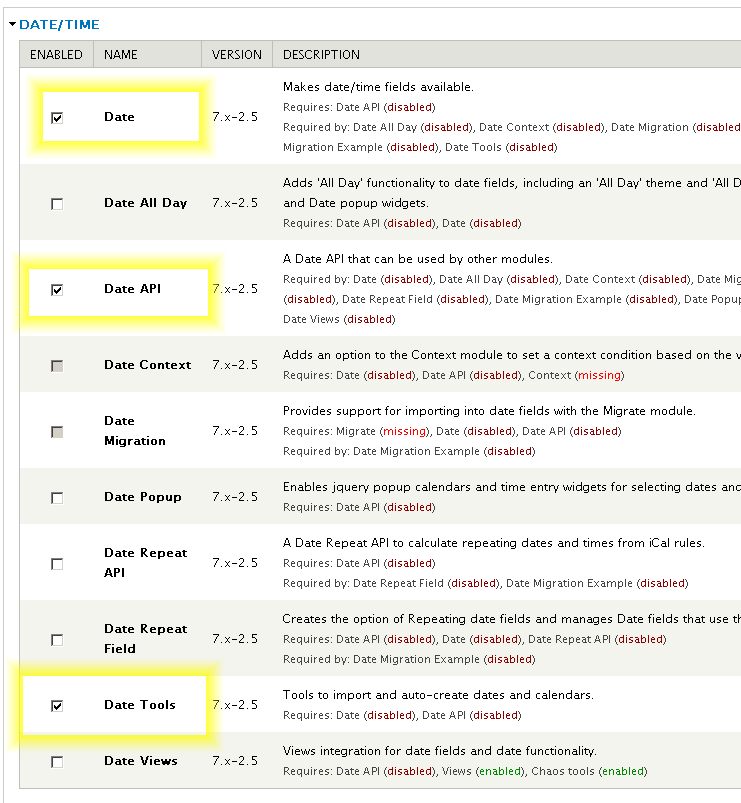
After you must click on :
 "The Date API requires that you set up the site timezone and first day of week settings and the date format settings to function correctly." 


admin/config/regional/date-time 


Related Modules:

Calendar
This module will display either Date field or system dates in a calendar.
Date iCal
This project will contain code and features needed to either import or export dates using iCal feeds.
Partial Date
This module tries to solve the problem of 'Fuzzy dates' -- dates where you don't know ahead of time if all values of the date will be provided. It also attempts to provide a solution for BC dates.
Signup
This module provides a system to allow users to sign up for a node that has a date field, including administrative reports and email notifications to the users.
CCK Signup
An alternative to the Signup module that creates signups as nodes.
Registration
A brand new alternative to Signup and Signup CCK that creates signups as entities.


Sunday, May 20, 2012

Drupal 7 Administration menu Screenshots an video tutorial

Download page:
Disable this modules:  
Overlay
Toolbar


Drupal 7 Pathauto Screenshots

The Pathauto module creates automatic path aliases for nodes, users, and category terms, eliminating the need to create them manually. This way, your site is more user and search engine friendly, and more descriptive about its content with less work from your side.

Module download page: http://drupal.org/project/pathauto
Documentation:  http://drupal.org/documentation/modules/pathauto
This module requires: Token to be enabled


Administer > Configuration > Search and Metadata > URL aliases, in the "Patterns" tab.
or admin/config/search/path


Drupal 7 Token Modul Screenshots

Download last version from: http://drupal.org/project/token
and installed.
Full documentation : http://drupal.org/handbook/modules/token
Note that Token module doesn't provide any visible functions to the user on its own, it just provides token handling services for other modules.

The tokens available depends on what modules you have enabled on your site.
To view a list of the currently available tokens on your site, you can navigate to the Help > Token (yoursite.com/admin/help/token) page.

List of tokens: http://drupal.org/node/390482 


Monday, May 14, 2012

TOP used Modules: Views and Ctools for Drupal 7

How to install top used modules in Drupal 7: Views ans Ctools
Download pages on modules:
http://drupal.org/project/views
The Views module provides a flexible method for Drupal site designers to control how lists and tables of content, users, taxonomy terms and other data are presented. This tool is essentially a smart query builder that, given enough information, can build the proper query, execute it, and display the results. It has four modes, plus a special mode, and provides an impressive amount of functionality from these modes. Among other things, Views can be used to generate reports, create summaries, and display collections of images and other content.
 Views is dependent from Ctools and mus by installed together with him.
Download page for Ctools:
http://drupal.org/project/ctools


Tuesday, April 24, 2012

The FAQ Field module provides a field for frequently asked questions

If your site has a single, simple FAQ page Added to an entity (eg. content type, user), you can create simple but smooth FAQs on any piece of content.
drupal.org/project/faqfield Demo page: http://ventral.org/blog/faq-field-demonstration