The following 8-minute video walks through the designs, and also provides a bit of background on the Spark project/ , technically this is intended to layer on top of the Panels module, for better forwards-compatibility with Drupal 8:
Tuesday, July 24, 2012

Monday, May 28, 2012
IMCE and BUEditor WYSIWYG HTML editor
IMCE is an image/file uploader and browser that supports personal directories and quota.
BUEditor is a text editor aiming to facilitate code writing.
Install 2 modules and they are ready to work.


Fill Demo : http://ufku.com/drupal/bueditor/demo
Features
- Basic file operations: upload, delete
- Image(jpg, png, gif) operations: resize, create thumbnails, preview
- Support for private file system
- Configurable limits for user roles: file size per upload, directory quota, file extensions, and image dimensions
- Personal or shared folders for users
- Permissions per directory
- Ftp-like directory navigation
- File sorting by name, size, dimensions, date
- Tabbed interface for file operations
- Keyboard shortcuts(up, down, insert(or enter), delete, home, end, ctrl+A, R(esize), T(humbnails), U(pload)).
- Built-in support for inline image/file insertion into textareas
- Multiple file selection(using ctrl or shift)
- Ajax file operations
- Themable layout using tpl files
Download page: http://drupal.org/project/imce
BUEditor is a text editor aiming to facilitate code writing.
Features
- Completely customizable editor interface
- Ability to create both image and text buttons
- Per role editor assignments
- Native support for html tags, bbcode tags, and other markup systems
Install 2 modules and they are ready to work.


Fill Demo : http://ufku.com/drupal/bueditor/demo
Saturday, May 26, 2012
Date module for Drupal 7 - Screenshots
Download last version from
http://drupal.org/project/date
and activate:
Date , Date API and Date Tools
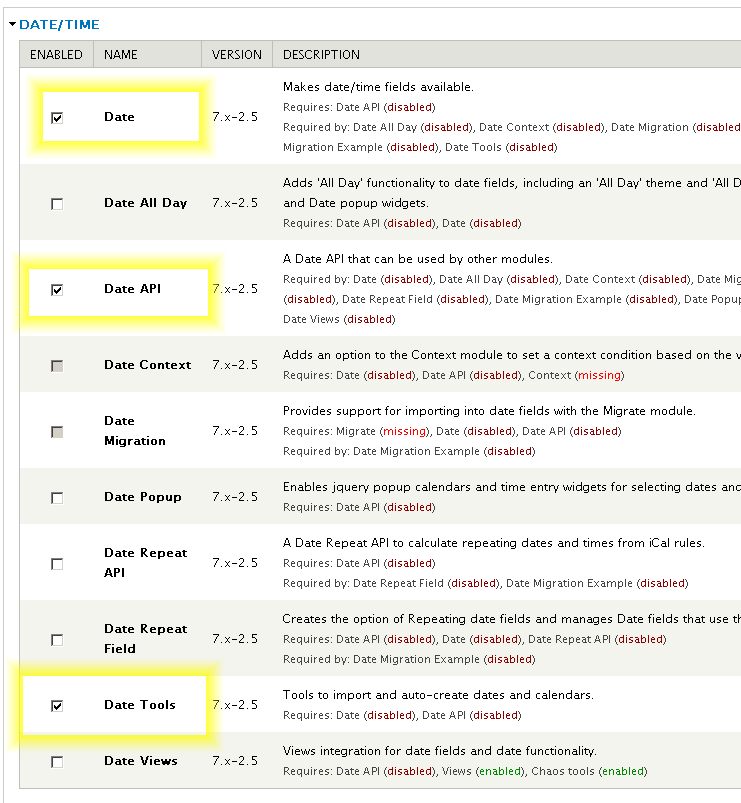
After you must click on :
"The Date API requires that you set up the site timezone and first day of week settings and the date format settings to function correctly."

admin/config/regional/date-time


Related Modules:
Sunday, May 20, 2012
Drupal 7 Administration menu Screenshots an video tutorial
Download page:
Disable this modules:
Overlay
Toolbar


Disable this modules:
Overlay
Toolbar


Drupal 7 Pathauto Screenshots
The Pathauto
module creates automatic path aliases for nodes, users, and category
terms, eliminating the need to create them manually. This way, your site
is more user and search engine friendly, and more descriptive about its
content with less work from your side.
Module download page: http://drupal.org/project/pathauto
Documentation: http://drupal.org/documentation/modules/pathauto
This module requires: Token to be enabled

Administer > Configuration > Search and Metadata > URL aliases, in the "Patterns" tab.
or admin/config/search/path


Module download page: http://drupal.org/project/pathauto
Documentation: http://drupal.org/documentation/modules/pathauto
This module requires: Token to be enabled

Administer > Configuration > Search and Metadata > URL aliases, in the "Patterns" tab.
or admin/config/search/path


Drupal 7 Token Modul Screenshots
Download last version from: http://drupal.org/project/token
and installed.
Full documentation : http://drupal.org/handbook/modules/token
Note that Token module doesn't provide any visible functions to the user on its own, it just provides token handling services for other modules.

The tokens available depends on what modules you have enabled on your site.
To view a list of the currently available tokens on your site, you can navigate to the Help > Token (yoursite.com/admin/help/token) page.

List of tokens: http://drupal.org/node/390482


and installed.
Full documentation : http://drupal.org/handbook/modules/token
Note that Token module doesn't provide any visible functions to the user on its own, it just provides token handling services for other modules.

The tokens available depends on what modules you have enabled on your site.
To view a list of the currently available tokens on your site, you can navigate to the Help > Token (yoursite.com/admin/help/token) page.

List of tokens: http://drupal.org/node/390482


Monday, May 14, 2012
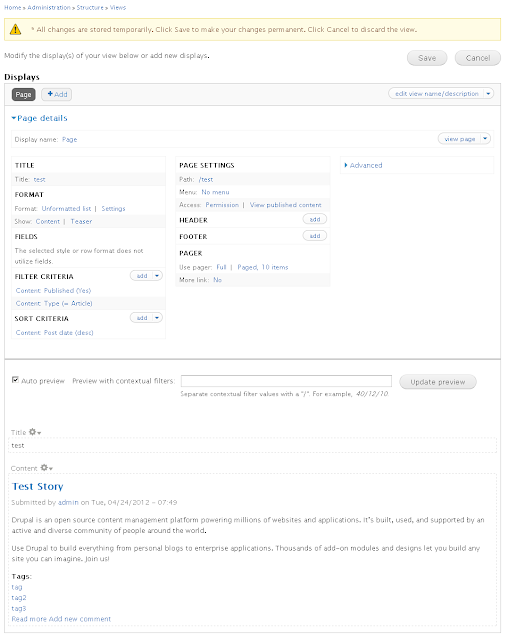
TOP used Modules: Views and Ctools for Drupal 7
How to install top used modules in Drupal 7: Views ans Ctools
Download pages on modules:
http://drupal.org/project/views
The Views module provides a flexible method for Drupal site designers to control how lists and tables of content, users, taxonomy terms and other data are presented. This tool is essentially a smart query builder that, given enough information, can build the proper query, execute it, and display the results. It has four modes, plus a special mode, and provides an impressive amount of functionality from these modes. Among other things, Views can be used to generate reports, create summaries, and display collections of images and other content.
Views is dependent from Ctools and mus by installed together with him.
Download page for Ctools:
http://drupal.org/project/ctools




Download pages on modules:
http://drupal.org/project/views
The Views module provides a flexible method for Drupal site designers to control how lists and tables of content, users, taxonomy terms and other data are presented. This tool is essentially a smart query builder that, given enough information, can build the proper query, execute it, and display the results. It has four modes, plus a special mode, and provides an impressive amount of functionality from these modes. Among other things, Views can be used to generate reports, create summaries, and display collections of images and other content.
Views is dependent from Ctools and mus by installed together with him.
Download page for Ctools:
http://drupal.org/project/ctools


Subscribe to:
Posts (Atom)